Engraved cutting boards look best when the logo artwork is a clean, single-tone vector file sized for the wood, placed where food and knives will not hide it, and checked on a proof before production. Custom Engraved Cutting Boards turns your file into a free mockup within 24 hours, so you can see the exact layout before you approve anything.
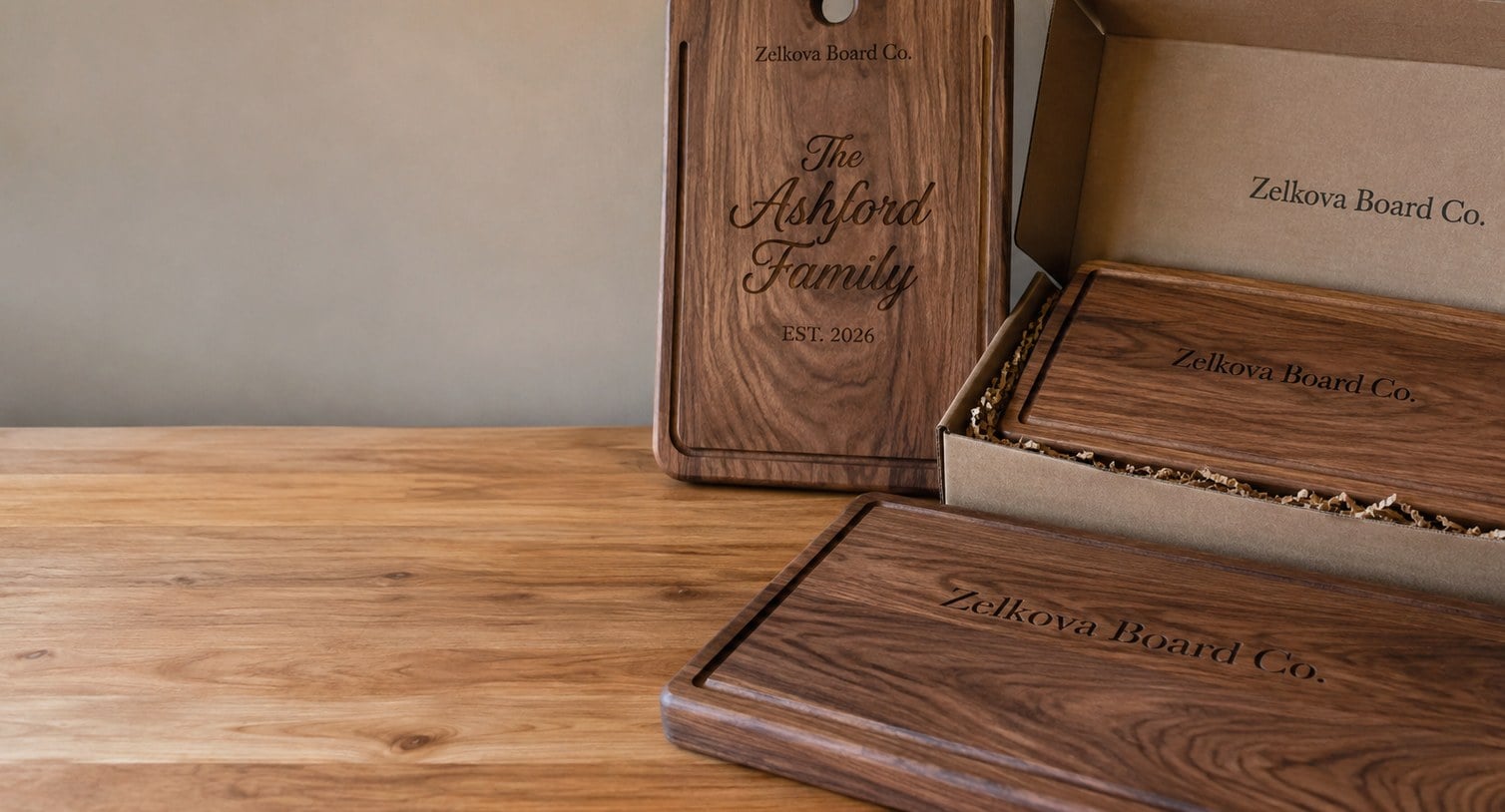
- A laser burns your design into the wood in one tone, so color logos are converted to a single shade
- Vector files (AI, EPS, SVG or vector PDF) give the crispest engraved edges
- Free mockup within 24 hours, unlimited free revisions, and you pay nothing until you approve
- Minimum order is 12 boards; standard turnaround is about 2 weeks
Why does logo artwork matter so much on engraved cutting boards?
Logo artwork matters on engraved cutting boards because a laser reproduces exactly what the file tells it to, line for line, in a single burned tone. There is no ink to hide a soft edge and no second color to separate a busy layout. A crisp file engraves as a crisp mark; a blurry file engraves as a blurry one.
Wood also adds its own character. Grain lines, natural color shifts and the difference between light and dark species all change how a logo reads from across a kitchen counter. A design that looks balanced on a screen can feel crowded once it sits on maple, or lose contrast on walnut if the strokes are too thin.
That is why Custom Engraved Cutting Boards treats artwork as the first step of every order rather than an afterthought. Getting the file right up front is the single biggest factor in how the finished board looks in a client’s home or on a restaurant pass.
Which file types work best for an engraved cutting board logo?
Vector files work best for an engraved cutting board logo: AI, EPS, SVG or a PDF saved from a design program with the vector paths intact. Vectors describe shapes mathematically, so the laser can follow clean outlines at any size without the stair-step edges that come from enlarging a small image.
High-resolution raster files such as a large PNG or JPG can still work, especially for photos, signatures or hand-drawn marks. The team simply has more cleanup to do, and very small web images rarely hold up once they are scaled to fill a serving board.
| File type | How it engraves | Best use |
|---|---|---|
| AI, EPS, SVG, vector PDF | Sharpest edges, scales cleanly | Company logos, crests, monograms |
| Large PNG or JPG | Good if the source is large and clean | Signatures, sketches, scanned art |
| Screenshot or social media image | Soft or jagged edges likely | Reference only, redraw recommended |
| Word or slide file with a pasted logo | Usually low resolution inside | Ask your designer for the original |
If you only have a low-quality version, send it anyway. The mockup will show whether it holds up, and you can decide on a cleaner source before anything is engraved.
How do color logos translate into a single-tone engraving?
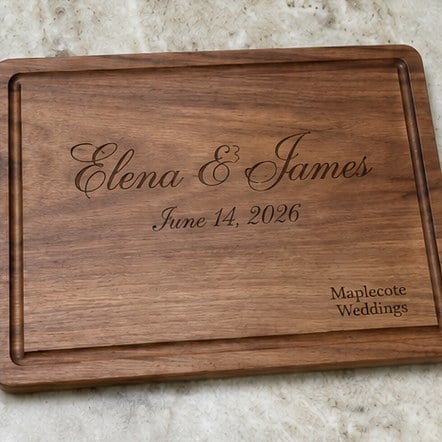
Color logos translate into a single-tone engraving by converting every color to either burned or unburned wood. The laser darkens the areas it touches and leaves the rest as natural grain, so a logo built on color contrast needs a version that works in one shade.
Most brands already have this artwork: a one-color, black or knockout version used for stamps, embossing or fax letterhead. That file is usually the best starting point for engraved cutting boards. Gradients, drop shadows and soft glows do not carry over well, because the laser cannot reproduce subtle tonal steps in hardwood the way ink can on paper.
- Solid shapes engrave as rich, even areas of darker wood.
- Outlines engrave as clean lines that let the grain show through.
- Gradients are usually simplified into solid areas or a line pattern.
- White text on a dark background may need to be inverted so the lettering is the engraved part.
The mockup from Custom Engraved Cutting Boards shows the converted version on the actual wood you chose, so you can judge contrast before approving.
Where should the logo go on an engraved cutting board?
The logo on an engraved cutting board should go where it stays visible during use and display. For boards meant for daily chopping, many buyers place the mark near a corner or along one edge so the main surface stays clear. For gift and display boards, a centered layout makes the engraving the hero.
Think about how the board will actually be used. A charcuterie board loaded with cheese and fruit will cover a centered logo, while a corner placement still shows at the table. A realtor closing gift often sits upright against a backsplash, so a centered address and family name reads best. A board with a juice groove frames the engraving inside the groove, which leaves less open space than a flat board.
- Centered: wedding, anniversary and closing gifts meant for display.
- Corner or lower edge: boards used for real prep and serving.
- Handle area: paddle-shaped boards, where a small mark stays visible.
- Both faces: logo on one side, a personal message on the other.
See how placement plays out across styles on the custom charcuterie boards and realtor closing gift cutting boards pages.
How small can text and fine detail be on an engraved board?
Text and fine detail on an engraved board need to be large and open enough for the grain not to swallow them. Thin serif fonts, tiny taglines and hairline strokes are the details most likely to fill in or look broken, especially on open-grained woods.
Rather than chase a specific measurement, use a simple test: if a tagline or legal line is hard to read when the logo is printed at business card size, it will be hard to read on wood too. Bold, simple letterforms almost always engrave better than delicate ones. Fine detail generally holds best on tight, light woods such as maple, while walnut gives stronger contrast for bold shapes. The laser engraved vs. printed cutting boards page explains why engraving favors clean lines over delicate effects.
When a layout is borderline, the Custom Engraved Cutting Boards team will flag it on the mockup and suggest a fix, such as dropping a tagline, thickening strokes or giving the text more room.
Can each board in one order carry a different name or message?
Yes, each board in one order of engraved cutting boards can carry a different name, date or message while sharing the same logo and layout. This is common for client gifting programs, employee awards, wedding party gifts and closing gifts where every recipient gets their own board.
The cleanest way to supply personalization is a simple spreadsheet with one row per board and one column per field, such as recipient name, address or date. Spell everything exactly as it should appear, including capitalization and accents, because the engraving will match the list.
- Send the shared logo artwork and your personalization list together.
- Review the mockup for the master layout and a sample personalized board.
- Check the list one more time for spelling before you approve.
- Production engraves each board from the approved list.
Personalized runs still follow the minimum of 12 boards. Teams planning recurring gifts can learn more on the corporate gift cutting boards page.
What artwork mistakes should you avoid on a first order?
The most common artwork mistakes on a first order of engraved cutting boards are sending a low-resolution logo, relying on color to carry the design, and cramming too much onto one face. Each one is easy to fix before production and hard to fix after.
- Grabbing the logo from a website. Web images are small and usually engrave with soft edges. Ask your designer or marketing team for the original vector.
- Keeping every element. Taglines, website addresses and phone numbers compete with the main mark. Choose what matters most.
- Ignoring the wood tone. A light, thin logo can fade into dark walnut; a heavy, dense logo can overpower a small board.
- Forgetting how the board will be used. A centered logo on a prep board gets covered and cut across.
- Skipping the proof check. Read every name and date on the mockup out loud before approving.
Custom Engraved Cutting Boards offers unlimited free revisions, so there is no reason to approve a layout you are unsure about.
How does the free mockup and approval process work?
The free mockup process for engraved cutting boards starts when you submit your artwork and board choice through the quote form. Custom Engraved Cutting Boards returns a digital mockup within 24 hours showing the logo placed on the wood style you picked, with any personalization shown on a sample board.
From there you can request changes as many times as you need. Common edits include moving the logo, resizing text, swapping to a lighter or darker wood, or simplifying a detail that looks crowded. You pay nothing until you approve the design, and production does not start until you do.
Once approved, standard turnaround is about 2 weeks, with faster turnaround available through express shipping when a date is tight. The full sequence is laid out on the how it works page, and you can start your mockup on the custom quote page.
Frequently asked questions
Can I send a hand-drawn sketch instead of a finished logo for engraved cutting boards?
Engraved cutting boards can start from a hand-drawn sketch, though the drawing usually needs cleanup before engraving. Scan or photograph it in even light against plain white paper. The design team at Custom Engraved Cutting Boards will trace it into clean artwork and show the result on your free mockup within 24 hours, so you can approve the cleaned version or request changes first.
Will my brand colors show up on engraved cutting boards?
Engraved cutting boards do not reproduce brand colors, because a laser burns the wood into a single darker tone. Your logo appears as a natural engraved mark against the grain. Brand recognition comes from the shape of the logo rather than the color palette. Choosing a darker or lighter wood changes the contrast, and the free mockup shows exactly how your mark will look.
How should I prepare a personalization list for engraved cutting boards with different names?
Engraved cutting boards with different names work best from a spreadsheet with one row per board and one column per field, such as name, date or address. Type each entry exactly as it should appear, including capitals and accents. Custom Engraved Cutting Boards engraves from the approved list, so a careful spelling check before approval prevents nearly every personalization error.
Should the logo go on the front or the back of engraved cutting boards used for chopping?
Engraved cutting boards used for daily chopping usually work best with the logo on a corner of the front or on the reverse face. Knife work across a centered engraving gradually wears it and hides it under food. Many buyers engrave a small mark on the prep side and a larger logo or message on the display side for the best of both.
Do thin fonts and fine lines hold up on engraved cutting boards?
Engraved cutting boards handle bold, open lettering far better than thin fonts or hairline strokes. Very fine details can fill in or look broken where the grain is open. Custom Engraved Cutting Boards flags delicate elements on the free mockup and suggests fixes such as thicker strokes, a simpler typeface or dropping a small tagline that will not read on wood.
Can a company with several sub-brands order engraved cutting boards with different logos?
Engraved cutting boards for a company with several sub-brands can carry a different logo on different boards when the order is planned as separate designs. Send each logo file and tell the team how many boards each needs. The free mockup shows every version side by side, and Custom Engraved Cutting Boards confirms the split before production begins.
Which wood gives the most contrast for a logo on engraved cutting boards?
Engraved cutting boards in light woods such as maple usually give the strongest contrast, because the burned logo reads dark against a pale surface. Walnut produces a richer, more subtle look where the engraving appears as a deeper shade of brown. Cherry falls in between. Ask for mockups on two woods if you want to compare before deciding.
Can engraved cutting boards include a QR code alongside the logo?
Engraved cutting boards can include a QR code, but the code needs to be large and simple enough to scan through wood grain. Dense codes linking to long web addresses are harder to read once engraved. Use a short link, keep the code generous in size, and test it on the mockup. Custom Engraved Cutting Boards will flag any code that looks risky.
What happens if my artwork is too low resolution for engraved cutting boards?
Engraved cutting boards made from low-resolution artwork tend to show soft or jagged edges, so the team will point this out on your mockup. You can then send a better source file from your designer or ask Custom Engraved Cutting Boards to redraw a simple mark. Nothing goes into production until you approve, so a weak file never becomes a finished board.
Can a wedding monogram or family crest be engraved on cutting boards with a logo-style layout?
Engraved cutting boards handle wedding monograms and family crests the same way as company logos: clean, single-tone artwork engraves best. Send the crest or monogram file, plus the names and date you want included. Custom Engraved Cutting Boards arranges the layout, shows it on a free mockup within 24 hours, and revises it until the balance feels right.
How long does artwork review take before engraved cutting boards go into production?
Engraved cutting boards move into production as soon as you approve the mockup, so artwork review takes only as long as your revisions. The first mockup arrives within 24 hours of submitting your files. Quick feedback keeps the schedule tight, and standard turnaround of about 2 weeks starts after approval, with express shipping available for tighter dates.
Get a free mockup for your engraved cutting boards
Send your logo or idea and the quantity you have in mind. Custom Engraved Cutting Boards returns a free mockup within 24 hours, you approve the design before anything is produced, and standard turnaround is about two weeks with faster options available. Get a custom quote.